All Parts Needed to Build a Gaming PC: Complete Beginner’s Guide (2026)
A beginner-friendly breakdown of every component needed to build a gaming PC in 2026, from CPU and GPU to cooling, storage, and power supplies.
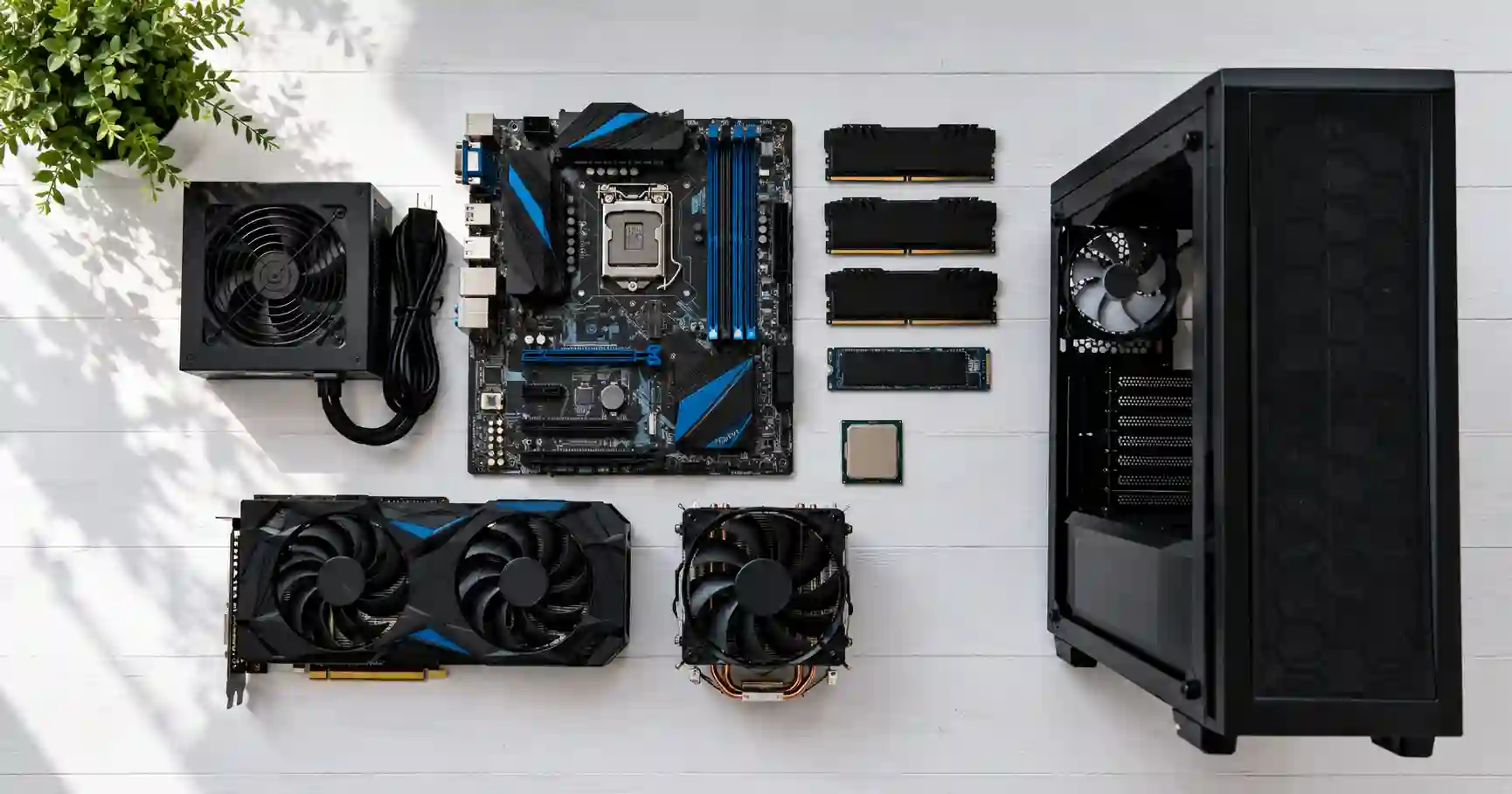
All Parts Needed to Build a Gaming PC: The Complete Beginner's Guide
So you want to build your own gaming PC? Awesome. I built my first one back in 2019 with a hand-me-down case and a $50 graphics card from a friend. It was slow, loud, and the side panel never fit right. But I learned every part inside that thing. Now I help people pick parts for their first builds every week.
This guide covers every single part you need. No fluff. No hard words. Just the stuff that matters.
The Big Picture: What Goes Inside a PC
Think of a gaming PC like a LEGO set. Every piece has a job. Every piece needs to fit with the others.
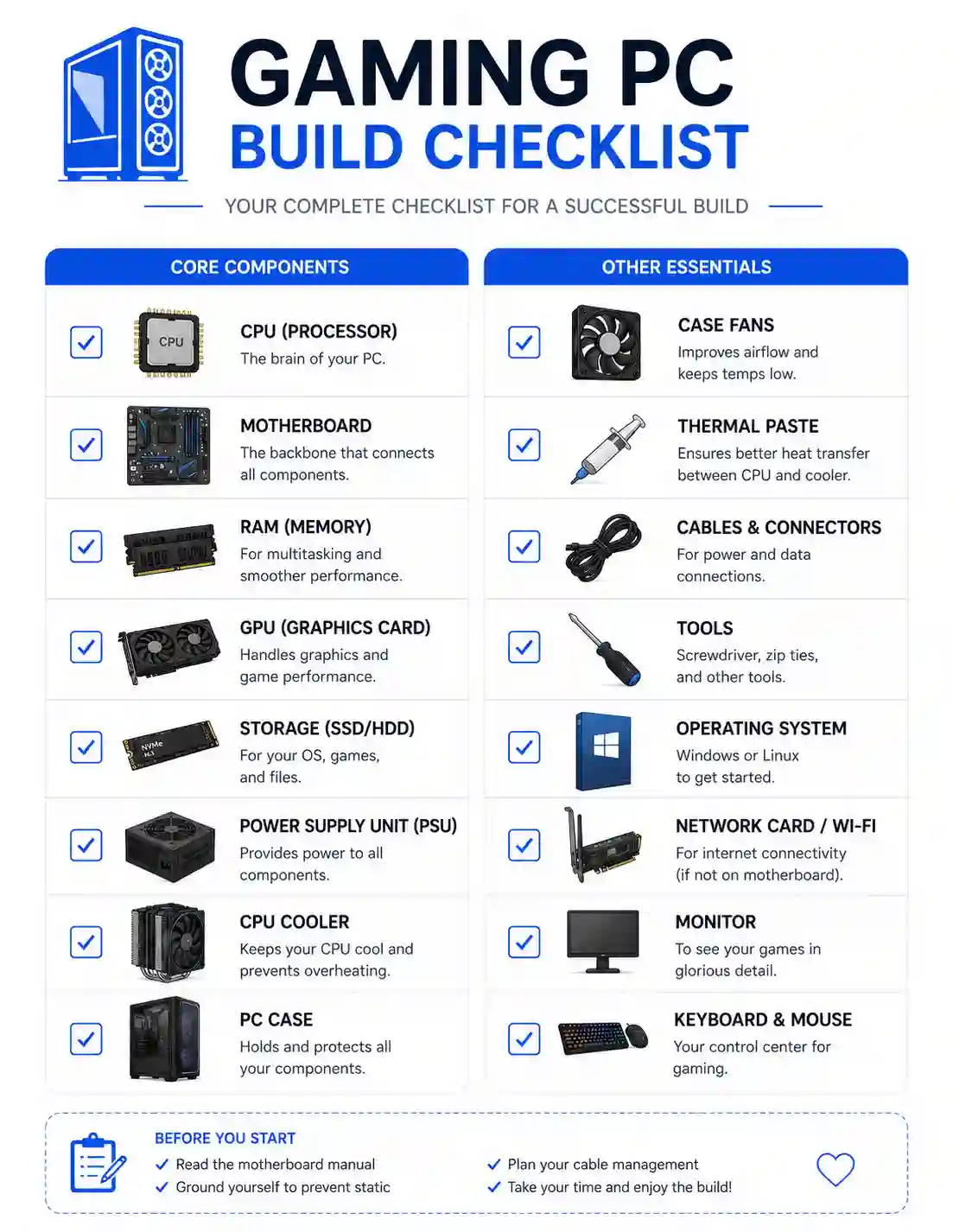
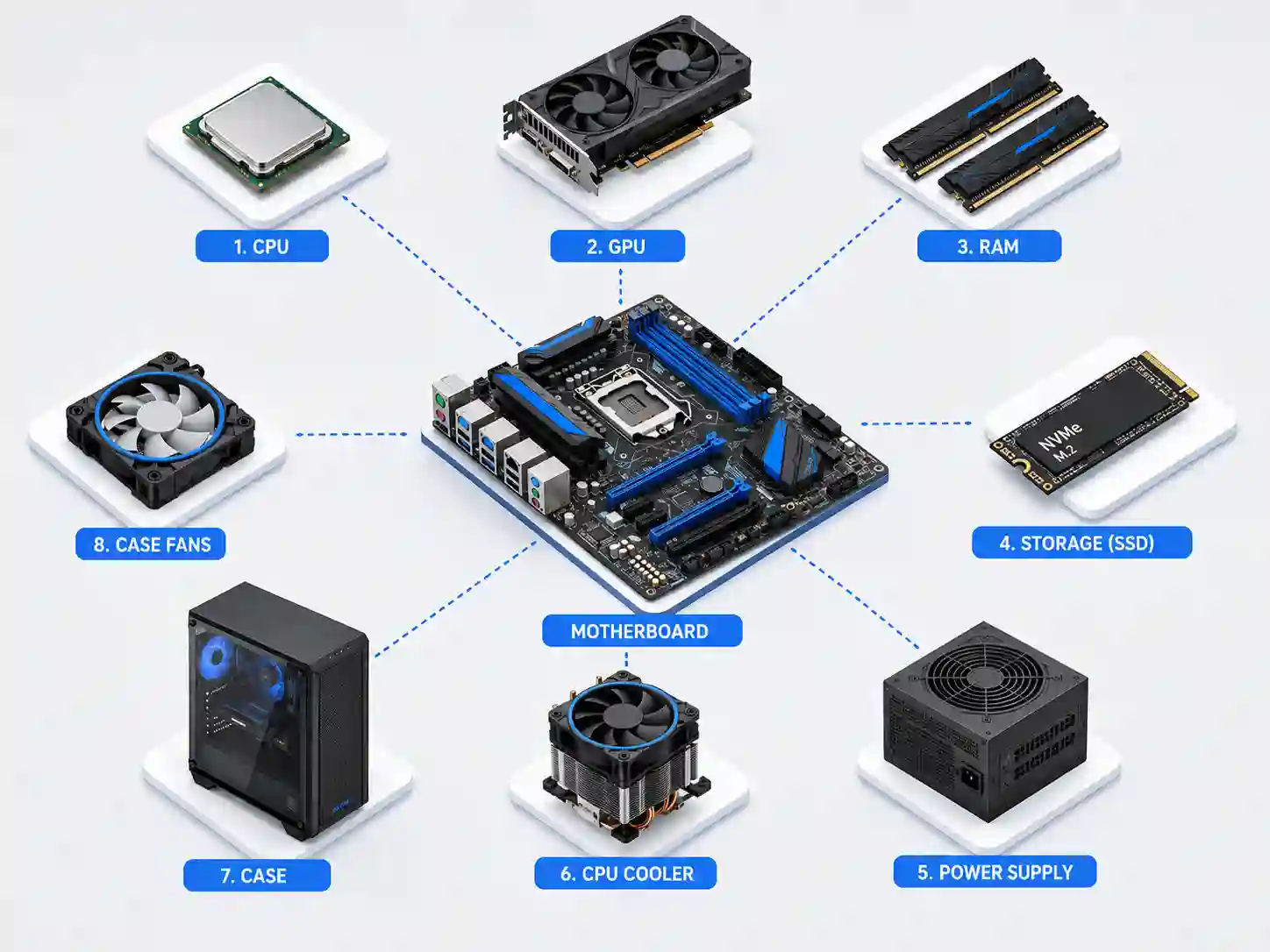
Here is the full list of what you need:
| Part | What It Does | Must-Have or Optional? |
|---|---|---|
| CPU | Thinks and calculates | Must-have |
| GPU | Makes pretty game pictures | Must-have |
| Motherboard | Connects everything | Must-have |
| RAM | Holds game data while you play | Must-have |
| Storage | Saves your games and files | Must-have |
| Power Supply | Gives electricity to all parts | Must-have |
| CPU Cooler | Keeps the CPU from getting too hot | Must-have |
| PC Case | Holds all the parts | Must-have |
| Case Fans | Moves air to keep things cool | Must-have |
| Monitor | Shows you the game | Must-have |
| Keyboard & Mouse | Lets you control the game | Must-have |
| Operating System | Makes the PC actually work | Must-have |
| Wi-Fi Card / Adapter | Connects to internet wirelessly | Optional |
| Extra Storage Drive | More space for games | Optional |
| RGB Lights | Makes your PC look cool | Optional |
The golden rule: Every part talks to every other part through the motherboard. If one part does not fit, the whole build fails.
Part 1: The CPU (The Brain)
The CPU is the brain of your PC. It tells every other part what to do.
What the CPU Actually Does
When you press "W" to walk forward in a game, the CPU figures out where your character goes. When enemies shoot at you, the CPU calculates if you get hit. It handles physics, game logic, and background tasks.
How to Pick One
You have two main brands: AMD and Intel. Both make great CPUs.
| Brand | Good For | Budget Pick | Mid-Range Pick | High-End Pick |
|---|---|---|---|---|
| AMD | Gaming, streaming, work | Ryzen 5 7600 | Ryzen 7 9700X | Ryzen 9 9950X |
| Intel | Gaming, single-thread speed | Core i5-14600K | Core i7-14700K | Core i9-14900K |
What to look for: - At least 6 cores for gaming - At least 8 cores if you stream while gaming - Check that your motherboard matches the CPU brand
My tip: Do not overspend here. A $200 CPU with a $500 GPU beats a $500 CPU with a $200 GPU every time.
Part 2: The GPU (The Eye Candy Maker)
The GPU makes the pictures you see on screen. It is the most important part for gaming.
What the GPU Actually Does
Every frame of your game - every tree, every shadow, every explosion - the GPU draws it. The better your GPU, the prettier and smoother your games look.
How to Pick One
You have three brands: NVIDIA, AMD, and Intel.
| Brand | Strengths | Budget Pick | Mid-Range Pick | High-End Pick |
|---|---|---|---|---|
| NVIDIA | Ray tracing, DLSS upscaling | RTX 5060 | RTX 5070 | RTX 5080/5090 |
| AMD | Great value, lots of VRAM | RX 9060 XT | RX 9070 | RX 9070 XT |
| Intel | Cheapest option, decent 1080p | Arc B570 | Arc B580 | - |
What VRAM means: VRAM is the GPU's own memory. More VRAM lets you use higher texture settings. For 1080p gaming, 8GB is okay. For 1440p, get 12GB or more. For 4K, get 16GB or more.
My tip: Buy the best GPU your budget allows. This one part matters more than anything else for gaming.
Part 3: The Motherboard (The Body)
The motherboard is the big flat board that holds everything together. Every part plugs into it.
What the Motherboard Actually Does
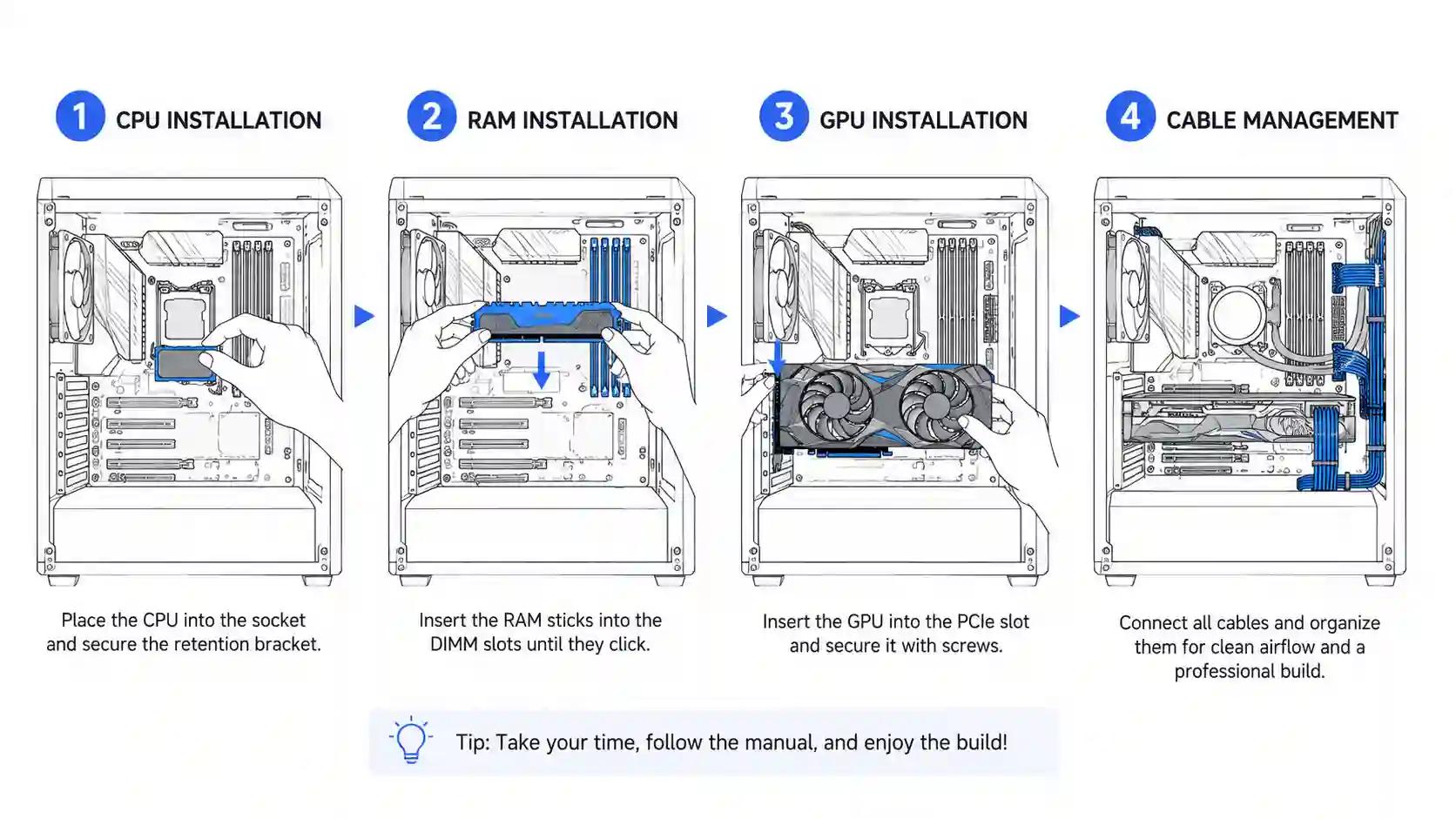
It is like the nervous system. The CPU sits in the middle. RAM slots sit nearby. The GPU plugs into a long slot. Storage drives connect to small slots. Everything talks through the motherboard.
How to Pick One
Motherboards come in three sizes:
| Size Name | How Big | Best For |
|---|---|---|
| ATX | Big | Most builds, lots of room |
| Micro-ATX (mATX) | Medium | Smaller builds, still good |
| Mini-ITX | Tiny | Very small builds only |
What to check: - Does it fit your CPU? (AMD needs AMD boards, Intel needs Intel boards) - Does it have enough RAM slots? - Does it have Wi-Fi built in, or will you need a separate card? - Does it have enough USB ports for your stuff?
My tip: A $150 motherboard works fine for most people. You only need expensive ones if you plan to overclock or need tons of features.
Part 4: RAM (The Short-Term Memory)
RAM is where your PC keeps game data while you play. Think of it like your desk. A bigger desk means you can spread out more papers.
How Much RAM Do You Need?
| Amount | Good For |
|---|---|
| 16GB | Basic gaming, okay for most people |
| 32GB | Great for gaming + streaming + having lots of tabs open |
| 64GB | Only needed for heavy video editing or future-proofing |
DDR4 vs DDR5
DDR5 is newer and faster. DDR4 is older and cheaper.
-
If you buy a new AMD build (Ryzen 7000 or newer), you need DDR5.
-
If you buy Intel 12th gen or newer, DDR5 works but DDR4 still works too.
-
For most gamers, 32GB of DDR5 at 6000MHz is the sweet spot.
My tip: 32GB is the new 16GB. Games are getting bigger. Spend a little extra now so you do not need to upgrade later.
Part 5: Storage (Where Your Games Live)
Storage is where you keep Windows, your games, and your files.
SSD vs Hard Drive
| Type | Speed | Price | Best For |
|---|---|---|---|
| NVMe SSD (M.2) | Very fast | Medium | Boot drive, main games |
| SATA SSD | Fast | Cheap | Extra games, files |
| Hard Drive (HDD) | Slow | Very cheap | Mass storage, old files |
How Much Storage?
-
1TB minimum for a gaming PC. Modern games are 100GB+ each.
-
2TB recommended if you play lots of games.
-
Add a cheap hard drive later if you need more space for videos or photos.
My tip: Put Windows and your favorite games on the fast NVMe drive. Put everything else on a cheaper drive.
Part 6: Power Supply (The Heart)
The power supply (PSU) takes electricity from your wall and gives the right amount to every part.
How to Pick One
Wattage: Add up how much power your parts need, then add 100-150 watts for safety.
| Build Type | Recommended Wattage |
|---|---|
| Budget build (under $800) | 550W - 650W |
| Mid-range build ($800-$1500) | 650W - 750W |
| High-end build ($1500+) | 750W - 1000W |
Efficiency Rating: - Bronze = okay - Gold = good - Platinum = great - Titanium = overkill for most
My tip: Never cheap out on the PSU. A bad PSU can fry your whole PC. Stick to trusted brands like Corsair, EVGA, Seasonic, or be quiet!
Part 7: CPU Cooler (The Fan for Your Brain)
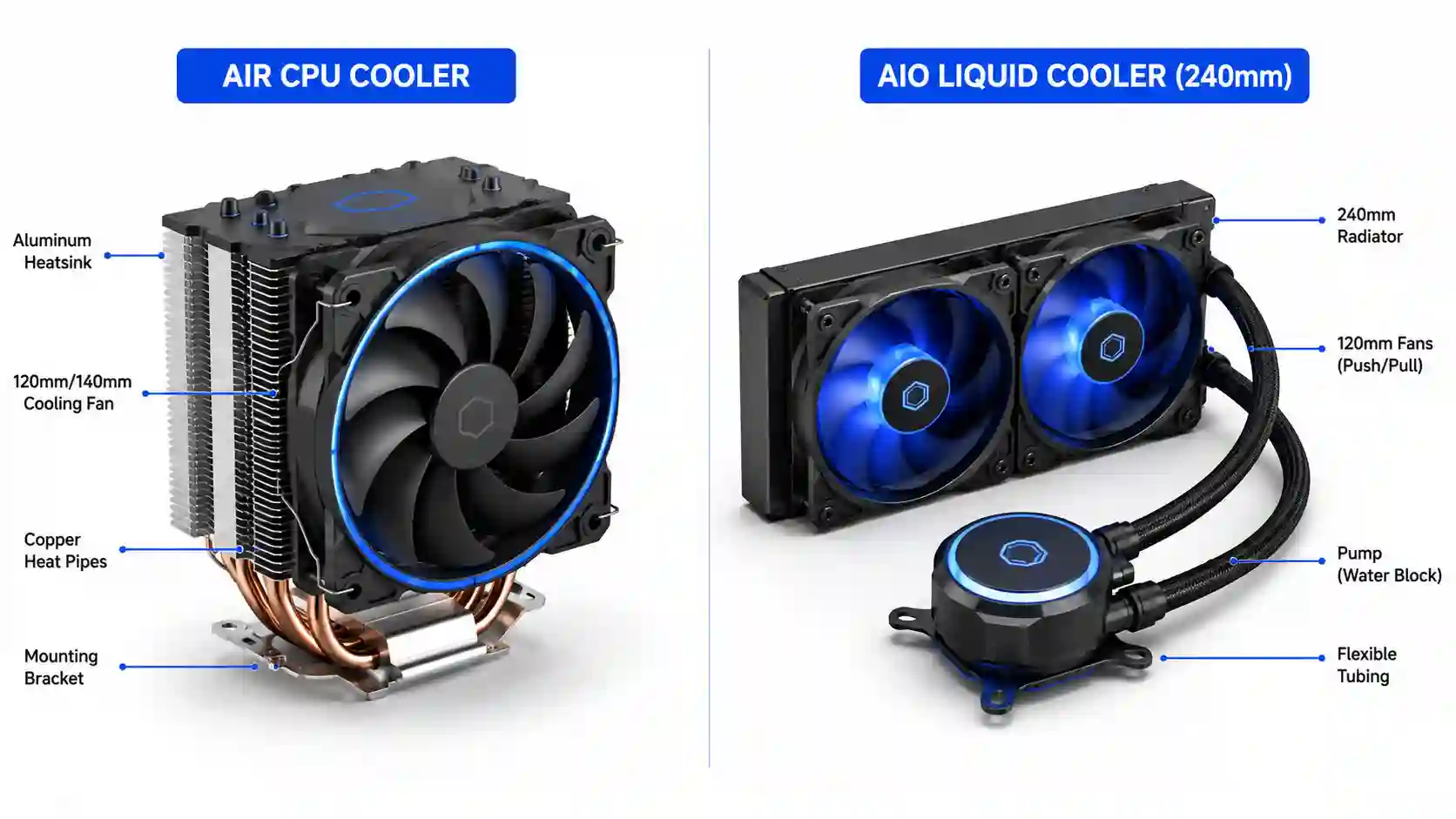
The CPU gets very hot when it works. The cooler keeps it from melting.
Air Cooler vs Liquid Cooler
| Type | How It Works | Best For | Price |
|---|---|---|---|
| Air Cooler | Big metal block with a fan | Most builds | $30 - $80 |
| AIO Liquid Cooler | Water moves heat to a radiator | Hot CPUs, looks cool | $80 - $200 |
My tip: Many CPUs come with a free cooler in the box. It works fine for basic gaming. Only buy a separate cooler if your CPU runs hot or you want it quieter.
Part 8: PC Case (The Home)
The case holds all your parts. It also decides how easy your build will be.
What to Look For
-
Size: Make sure it fits your motherboard size (ATX, mATX, or ITX)
-
Airflow: Look for mesh front panels, not solid glass fronts
-
Cable management: Room behind the motherboard to hide wires
-
Drive bays: Enough spots for your storage drives
My tip: A case with good airflow beats a case that looks pretty but chokes your parts. Hot parts = slow parts.
Part 9: Case Fans (The Airflow Helpers)
Fans push hot air out and pull cool air in. Good airflow means your parts stay cool and last longer.
How Many Fans?
| Case Size | Minimum Fans | Ideal Setup |
|---|---|---|
| Small case | 2 fans | 2 in front (pull in), 1 in back (push out) |
| Medium case | 3 fans | 2-3 in front, 1 in back, 1 on top |
| Big case | 4+ fans | 3 in front, 1-2 on top, 1 in back |
My tip: More fans are not always better. Focus on direction. Front fans pull cool air in. Back and top fans push hot air out. That is the magic setup.
Part 10: Monitor, Keyboard & Mouse
These are the parts you actually touch and look at.
Monitor
| Resolution | Best For | GPU Needed |
|---|---|---|
| 1080p | Budget gaming, high frame rates | RTX 5060 / RX 9060 |
| 1440p | Sweet spot for most gamers | RTX 5070 / RX 9070 |
| 4K | Best picture, needs strong GPU | RTX 5080+ / RX 9070 XT+ |
Refresh rate: 144Hz or higher is great for competitive games. 60Hz is fine for casual play.
Keyboard & Mouse
-
You do not need to spend $200 on a keyboard. A $50 mechanical keyboard is great.
-
For mice, look for one that fits your hand size. Weight matters too - lighter is usually better for fast games.
My tip: Do not buy a $2000 PC and pair it with a $100 monitor. Your monitor is the window to everything. Spend at least 15% of your total budget here.
Part 11: Operating System
You need Windows (or Linux) to make the PC work.
-
Windows 11 is what most gamers use. It costs about $140.
-
You can install it from a USB drive you make on another computer.
-
Some people buy cheap keys online. I do not recommend this - they often stop working.
My tip: If you are a student, check if your school gives Windows for free. Many do.
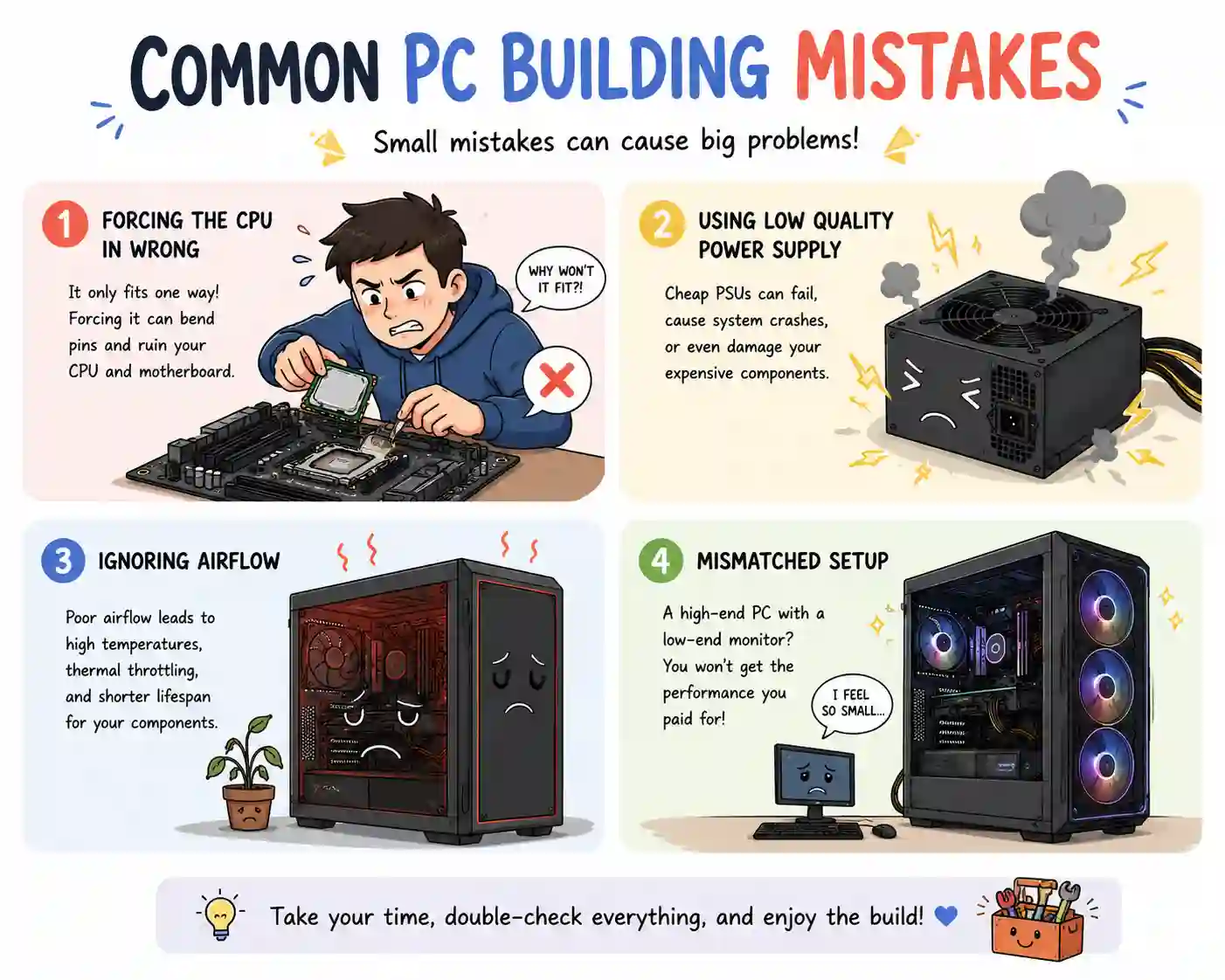
Common Mistakes First-Timers Make
Here are the big ones I see all the time:
1. Buying Parts That Do Not Fit Together
An AMD CPU will not fit an Intel motherboard. A big GPU might not fit a small case. Always check sizes before you buy.
2. Forgetting the Power Supply Wattage
If your parts need 600 watts and your PSU only gives 500, your PC will crash or not turn on.
3. Cheaping Out on the Power Supply
A bad PSU can kill your whole PC. It is the one part where "good enough" is not good enough.
4. Not Checking RAM Compatibility
Some motherboards only work with DDR4. Some only work with DDR5. Read the specs.
5. Buying Too Much Storage or Not Enough
1TB fills up fast with modern games. 2TB is the sweet spot for most gamers in 2026.
6. Ignoring Airflow
A pretty case with no airflow will cook your parts. Mesh front panels are your friend.
7. Forgetting You Need a Monitor
I have seen people spend $1500 on a PC and use a 10-year-old monitor. Do not be that person.
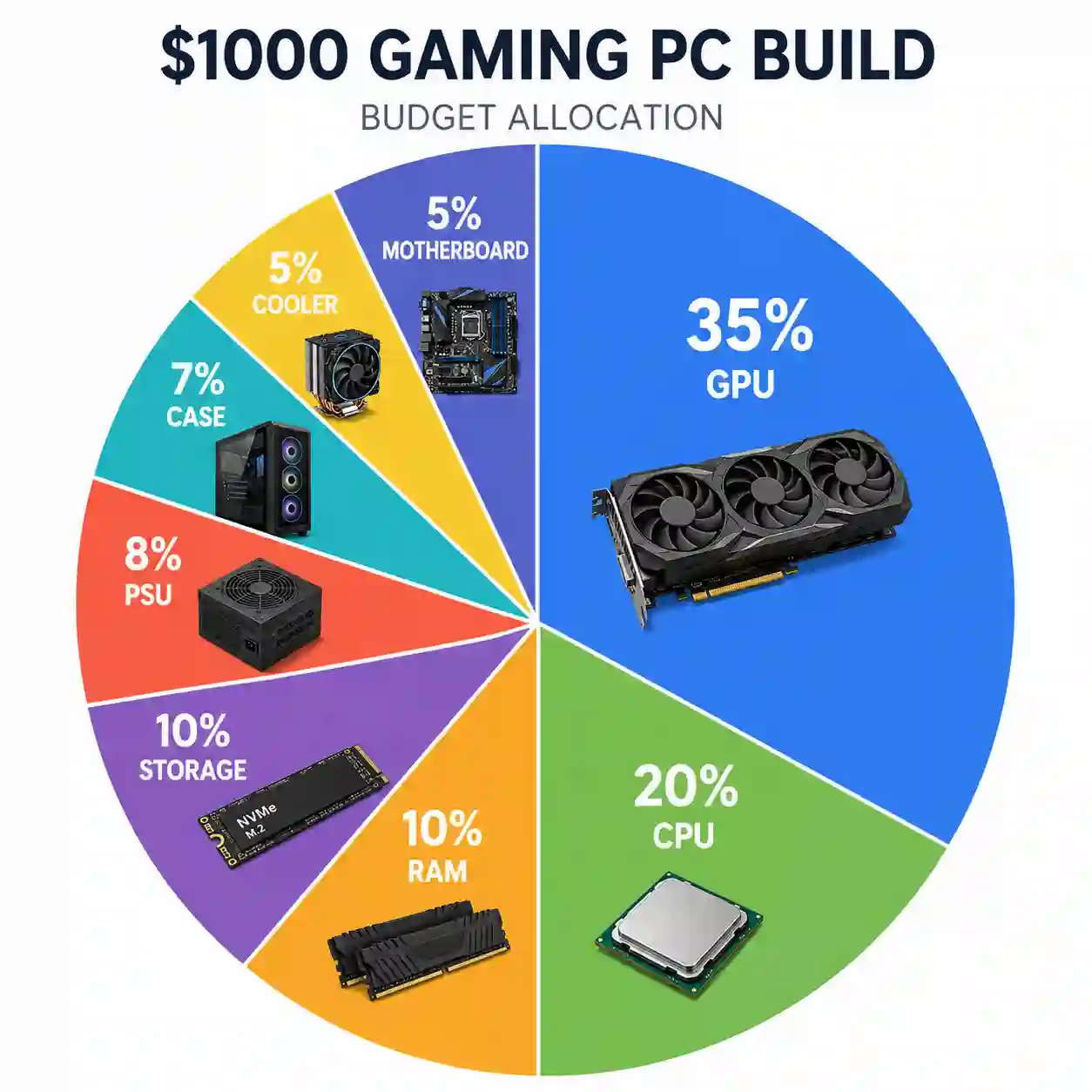
How Much Should You Spend?
| Budget | What You Get | Example Parts |
|---|---|---|
| $600 - $800 | 1080p gaming, medium settings | Ryzen 5 7600, RTX 5060, 16GB RAM |
| $800 - $1200 | 1440p gaming, high settings | Ryzen 7 9700X, RTX 5070, 32GB RAM |
| $1200 - $2000 | 1440p/4K, ultra settings | Ryzen 9 9900X, RTX 5080, 32GB RAM |
| $2000+ | 4K gaming, everything maxed | Ryzen 9 9950X, RTX 5090, 64GB RAM |
My tip: The $800-$1200 range is where most people should aim. It gives you great 1440p gaming without breaking the bank.
Quick Checklist
Before you buy anything, check every box:
-
☐ CPU picked and matches motherboard socket
-
☐ GPU picked and fits in the case
-
☐ Motherboard picked and matches CPU brand
-
☐ RAM picked and matches motherboard (DDR4 or DDR5)
-
☐ Storage picked (at least 1TB NVMe SSD)
-
☐ Power Supply picked with enough wattage + good brand
-
☐ CPU Cooler picked (or using stock cooler)
-
☐ Case picked that fits motherboard size
-
☐ Case fans planned (at least 2-3)
-
☐ Monitor picked that matches GPU power
-
☐ Keyboard and mouse picked
-
☐ Windows 11 ready on USB drive
-
☐ All parts checked for size compatibility
Table of contents
Jump to the section you want to read.
FAQs
Tags